
















































































Menu
Menu
Your Cart
We use cookies and other similar technologies to improve your browsing experience and the functionality of our site. Privacy Policy.

Up to 18% extra discount on selected products with coupon DFRIEND

Initial Audio Difro

Initial Audio Difro
New

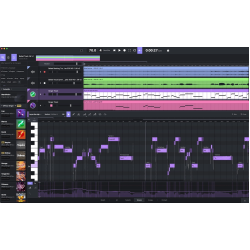
Play live or drop a MIDI idea, then Re-Imagine a new melody. Or drag an audio loop onto the piano roll. Version 2.5 also runs as VST3 and AU. No cloud. No subscriptions.\n\n

Audio to MIDI

Drop an audio loop on the piano roll and Difro pulls out the melody as MIDI, including velocity. Built for melodic loops up to 16 bars — a full song is truncated to the first 16 bars.\n

VST3 and AU plugin

The full Difro experience inside your DAW. Sync output, stream MIDI and audio in real time, or mute below Master gain and route MIDI only.\n

Key triggering

In the plugin, MIDI notes start and stop playback, with a latch option so one hit holds the loop. Turn it off and incoming notes play the instrument loaded inside Difro.\n

Interactive Quick Start

A new in-app tutorial walks first-time users through the UI and the basics of generating, converting, and dragging out MIDI.\n

A workspace you can reshape

Drag section edges to give more room to the piano roll, packs, or mixer. Brightness and contrast sliders live in the title bar. The UI is snappier throughout.\n

Lighter, ready for Blackwell

About 300MB smaller to download and run. Windows now supports NVIDIA Blackwell GPUs. Older Maxwell cards are no longer supported.

The full Difro experience. Inside your DAW.

Difro 2.5 ships as a VST3 and AU plugin — the same piano roll, packs, and generation, locked to your project tempo. Output MIDI, audio, or both in real time.\n\n

Not a randomizer. A real musician.

Difro actually understands melody, rhythm, and chord progressions. It keeps the DNA of your original idea while creating something entirely fresh.\n\n

Host Your Favorite Plugins.

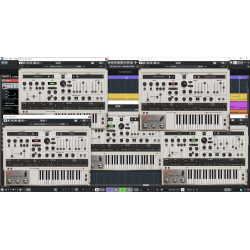
Load Serum, Kontakt, or Omnisphere directly inside Difro — in the standalone app and in the new VST3 / AU plugin. Audition your new AI melodies with your exact presets before you export.\n\n

Bounce a loop. Drag it anywhere.

Hit Render to WAV and Difro bounces the generated melody to an audio loop. Drag the WAV to your desktop, a custom folder, or straight into your DAW as a sample. Prefer MIDI? Click the output MIDI clip right below the Render to WAV button and drag that out instead.\n\n

An AI that adapts to you.

Difro 2 is not a static model. Rate a generation and name the Feedback model — a personal adapter that learns the music you actually like. Keep several named models, pick Difro 1 or Difro 2 as the base, and switch anytime. Edit the MIDI first, then rate it positive, and the adapter learns how you expect the output to look.\n\n

Write a review

Please login or register to review